Salesforce Implementation Strategies & Designs - Part 2
Part 2: Case Types for Structured and Unstructured Data
When teams are asked to “improve a process, with AI” it can be approached as a redesign (what steps can be removed, merged or automated) rather than just “find the part of the process step to insert AI (Claude).”
I have found that there are many things that can be done from a data, structure and process standpoint without immediately leveraging AI that sets the foundation for a stronger AI strategy and design in the future. These actions allow AI to be created in a more sustainable, antifragile manner.
One of the items that I found was a big value add for a company’s AI strategy is addressing the Object Types (Case Types or Lead Types, Opportunity, Work Order, etc). For this article I will focus on the creation of Case Types for structured and unstructured data resolution and design.
In most real-life scenarios you will be given multiple source systems that provide different types of data which will need to be mapped to the correct Case Record. Before we dive into Source Systems let’s review the preparation I use to support the project that drives the ‘Trust’ and ‘Clarity’ discussion from Part 1.
PREPARATION GROUNDWORK:
First let’s review the templates that keep the project on track. These are documents I use to support the requirements of the life cycle. I have written quite a bit on getting to know the data; where it lives, its state (GYR) and where it needs to go. These docs will provide the support you need to be successful no matter the complexity or challenges. I always have these documents open and add to them iteratively throughout the day, everyday.
· SDD Template prefilled with holders, flows, data tables for the project. Also works for Data Migration and Integration projects. SDD holds the Current State>Future State>Gap Analysis>Design>LoE.
· TDD Template provided and reviewed with Dev team and Technical Architect.
· Systems Diagram with RYG overlays to represent where issues and blockers lay. Excel sheet (Google sheet) with tabs for each system. Typically found in both SDD and TDD documents.
· Process Flow Templates that have the full object lifecycles and its subsets for more granular process flow designs. BRYG boxes mapped to Requirement IDs.
· Requirements with IDs that map to the process flow and system diagrams signed off by customer. Primary requirements include the Why or Value Add.
Creating Strong Requirements:
Before moving forward with my use case its important to have primary parent requirements as an anchor for the sub-requirements children. The primary requirement should provide enough context to support: Who it’s for, What you are trying to do/accomplish and Why or the value (can include ROI). These will be applied to the flows so you can track the status through the process builds.
Requirements:
· Who: “Ability for the Salesforce System…”
· What: “to assign data set to the correct Case Type…” (action-agnostic)
· Why (Value add): "using a Single, auditable classification standard that scales across current and future use cases to: standardize and automate a process that has been manual, error prone and lacks measurement for ROI.” (testable)
· Design Notes: Provide a process workflow (mentioned in documents) to support the requirement by presetting the flow boxes with the OOB solution (light blue) from Salesforce and go from there into custom flows.
6 SOURCE SYSTEMS:
First you need to get your source systems right so let’s review the source systems where the data sets come from and break them down. These are 6 real life source models pulled from actual projects. Each of the sources contain different types of data sets. Some are structured and some are unstructured. Remember to apply rules to each of the source systems.
Structured Source Systems:
IoT Systems: (Deterministic/Structured)
· 3 IoT systems: (Deterministic/Structured) 5 were identified but only 3 were able to support the Case process in Salesforce for the timeline of this particular project. 2 of the 3 IoT systems were not providing enough information in the data set to create a Case in Salesforce. During the project we needed additional input from the IoT systems so this was a side project that ran in parallel with the primary project of setting up the assets, asset hierarchies, warranties, SLAs, contracts and such in Salesforce Field Service platform.
· The IoT requirement for the data set required; IoT location (Physical building), asset location (Rack), asset (System) ID and the measures that tracked asset threshold limits. Part ID was a goal for this project but was not required as a diagnosis assessment was required at the system level to determine which parts needed to be addressed. A simplified example: Ex. BLDG-MG402 with IoT alert code WARN-4471 from Asset System ID A-88213. For other projects the part ID was required so it will depend on the depth needed in your requirements.
· IoT Challenges: IoT Cases (data sets) were being sent every X minutes which meant the teams had to filter out all the duplicates which would run as long as the asset threshold limits were being met. Teams were not able to immediately identify where the issue was coming from due to lack of data which required additional diagnostic assessment, nor were they able to stop the issue cases from being created. Emails were also being sent by the customer and teams would have to track down the IoT case to confirm it was the same issue, phone calls would come in if the system was down and priority was urgent. In short, the IoT process was not working so there were manual interventions across all teams that were not standardized causing extra work and a lack of visibility amongst the teams both client and support staff.
· IoT Outcome: As mentioned, working in parallel teams were able to do some R&D on the 3 IoT systems to add additional values and structure to the data set output. The other 2 are a work in progress.
Customer Portal: (Deterministic/Structured)
· Building a Customer Portal allowed us to eliminate multiple channel noise from emails, phone calls, chats, etc. We were also able to standardize on the structure of the data coming into the Salesforce system and communicate the status, comments and actions in real time without sending multiple emails or phone calls.
· Client would get emails with Case information but could follow up from the email directly to the portal for communication on the case record eliminating email chains and allowing collaboration across teams in a single channel.
· This also created a historical reference for context, tracking and accountability.
Vendor Portal: (Deterministic/Structured)
· Overview: The client works with multiple 3rd party vendor companies to support their service models to implement and maintain their products to their high-capacity standards. These are field service technicians working directly on assets in the field and need to work within the client’s parameters, expectations and standard processes of the Work Orders.
· Challenge 1: Work was done on word documents, paper and uploaded to the clients system as the current digital process was on another platform and loads were taking too long. This was a 2 to 3-day submission process as it was not submitted directly on closure of the Work Order but end of day or next day. Notes regarding state of asset, issues, challenges and fixes were not documented in a way that was structured or sustainable for digital formats and most of the work had some form of manual intervention which extended the Work Order closure timelines.
· Challenge 2: Other vendors would be less inclined to leverage the clients platform as they had their own way of executing Work Orders on their own digital custom platforms. This meant that information was transferred and in many cases was not done according to the clients process and data would be missing on key fields which required additional follow ups.
· Vendor Output: Building the Vendor Portal provided a digital format for 3rd party technicians to seamlessly execute Work Orders directly in their system with clients standards built into the process whether they were operating in their platform or the clients vendor portal.
· Rule: The Vendor Portal cases can't share a label with Customer Portal cases even though they hit the same Case object.
Client Internal database: (Deterministic/Structured)
· Challenge: Internal teams were required to open a new system, login, copy and paste or apply detailed information to the system case record that was created and then submit the case record. They would receive a Case ID in their email but to follow up or find the status of the case they were required to log back into the case management system, put their case number in and search to review the status of the case.
· Integrating the systems eliminated the need to swivel to different systems. Action button provided on current system to create the case and tab with pre-set filters providing access in real time with fewer clicks.
· Internal Team Output: Adoption was high and data standards improved dramatically across multiple areas. I am not discussing one project but multiple project successes that provided ROI in many ways unseen in the original expectations of the requirements. It’s always good to keep an eye on the grey areas of value like adoption and users being happy with the systems that they interact with on a daily basis. Use milestone status timelines being measured. In all projects, these grey areas went up dramatically which impacts employee retention, focus and happy worker conditions.
Unstructured Source Systems:
The unstructured sources provided classification problems:
1. Resolving informal internal shorthand (Slack)
2. Email was free flowing content phrases without structure. High confidence (information is correct but stated in a way that is not structured) so it is still considered to be ambiguous messages (Email).
3. Handle unstructured, multi-intent (can be multiple asks per email): Eg. “I have an issue with X asset but also my invoice is not correct for Y”,
Each of these requires different handling methods. The mistake I’ve seen teams make is to say "just add AI classifications" without looking at their actual sources first. It’s always more complex than it appears. I go into some detail below on how to work with the unstructured data.
PROJECT EXPERIENCES:
Before you can begin to get into Source Strategies you need to review the gap that exists in the source systems for mapping and begin the process with bringing the data sets to a standard that is acceptable for a Case to be created in Salesforce. The VIP treatment.
That is why it is imperative for any project to get access to the data quickly and often. The client’s data is their asset just like the services and products that they provide. Here are a few situations that we ran into when we started our projects so that you don’t think we just rolled into the project and started mapping data over.
· Multiple Source Systems: Some systems produced incomplete data sets where heavy manual intervention was required to bring the data to an acceptable state. Our team had to pull information from other sources and aggregate the data set to provide the full picture for the Case to be created in Salesforce. This was set up to run in an automated process eliminating the need for human intervention. It was still a ‘trust but verification’ system but we were able to provide a very structured output without involving multiple teams and divisions, validations and individuals while keeping a measurable and acceptable timeline. I may mention that there was a bit too much tribal knowledge in these cases.
· Disparate Sheets: In a different project we had multiple sheets with massive data records and no clear way of connecting the primary asset to its associated parts without lookups across multiple sheets as they were tied to another ID on other sets of sheets. This created a real challenge not only to bring the data into Salesforce to run automated warranty checks and other actions but just to do the mapping work that needed to take place to support the warranty process. It took weeks of meticulous, aggregated mappings and data migrations, but we were able to structure around 85% of the sheets to an asset hierarchy that would support the asset lifecycle. Again, the tribal knowledge on this was deep and unsustainable.
WORKING STATEGY:
As I mentioned in Article Part 1, I will take you through the steps of work involved in addressing the categorization and taxonomy.
1. Discover & Extract: Pull all existing case types, codes, and free-text labels from your source systems. Apply to a table. Begin with structured data first.
2. Design Taxonomy: Define how many levels/tiers your business needs for reporting and routing. Actions are output for each item.
3. Categorize (Map): Align the messy source data into the clean taxonomy slots.
4. Govern: Create rules for how new case types get added to the taxonomy in the future. *This is not covered below as its something the CoE team needs to address per the company compliance and process reviews.
Begin:
1. Discovery & Extract:
Pull all existing case types, codes, and free-text labels from your source systems. Apply to a table. Begin with structured data first.
Address Structured First, then Unstructured
Begin by splitting the 6 sources into 2 buckets for structured and unstructured data sources. Use a simple excel sheet to begin your work process.
Start with the deterministic structured side because it's fast and it shrinks your real problem down to just the two unstructured sources. You also have most of this information available to you already so don’t treat it like a probabilistic challenge. It also targets and defines some of the key categories that will align unstructured data to fall into making your overall process easier.
Rule of thumb by source type.
You don’t want to just pull 50 to 100 data samples. For example, if you pull 100 examples and 80 of them are "Warranty Claim" because that's your most common issue, you've got almost nothing to build ground truth for your other Case Types which are usually the ones that actually need help, because common cases tend to have obvious language and rare ones don't.
The number to track is: how many labeled examples do I have per Case Type, not per source.
So, for your structured sources (IoT, Customer Portal, Vendor Portal, internal database): you don't need a sample size at all but a complete coverage of every field/code combination that exists. If your IoT system has 40 distinct alert codes, you need all 40 mapped, not a sample of 40 out of 200 IoT occurrences. This is a lookup table so "sample size" doesn't apply here, so approach it as a deterministic problem.
2. Design Taxonomy:
Define how many levels/tiers your business needs for reporting and routing. Actions are output for each item.
Begin categorizing the data into groups.
I use both Categorization and Taxonomy terms so its good to know the difference and why we start with Taxonomy first. When mapping case types from source systems, you should almost always establish your taxonomy first before doing detailed categorization. Defining your overarching structural framework provides the “rules” and "buckets" you need to accurately categorize individual source data points. (*see chart image below)
These are reviewed in detail in Part 1 but for a quick reference review the definitions below:
· A categorization (or classification) is the active process of sorting individual items into predefined categories or in our case groups based on shared traits using flat or loose groupings whereas..
· A taxonomy is the overarching framework or hierarchical structure that defines categories and their relationships. It’s a deeper, organized system that builds a parent-child or tree-like hierarchy. It defines strict relationships, such as broader categories breaking down into more specific sub-categories. (e.g., Hardware > Mobile > Screen Damage). You can start with a flat taxonomy and begin to build to the levels from there.
· Rule: While all taxonomy is categorization, not all categorization is taxonomy.
Below is a good table I found in a Google Search.
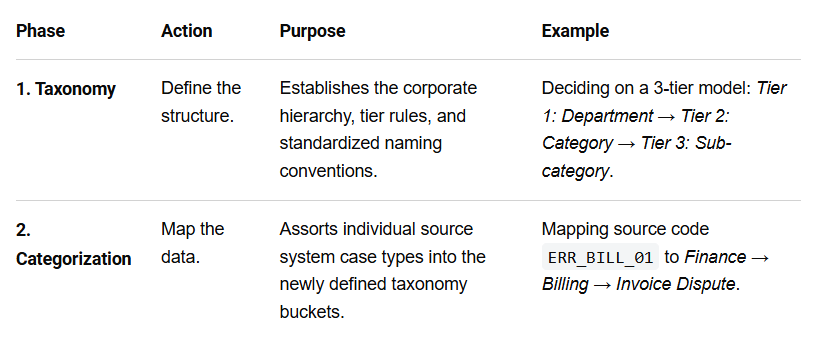
Design Note: Do not begin with a hierarchal taxonomy but keep your taxonomy flat to allow your focus to be on the building of a solid foundational structure to build off of. The flat taxonomy is really asking "what is this Case," and is NOT tied to any one downstream flow yet.
Design Note: Don’t start from scratch. Look up key Case Types from your industry to get a start if needed. I added these here on this document for reference below. You also may be changing your categories as you find that a Tier 1 will move to a Tier 2 category in the hierarchy. Keep things flowing.
At this point you will have some form of classification so let’s move onto the Taxonomy layers and actions.
The Taxonomy Role: Downstream Actions
Introduce a second, separate mapping after classification: Case Type → downstream action(s). This is where you show that one Case Type can spawn multiple parallel actions (Source > Case Type > Work Order>Notifications>etc) while another spawns just one (Source > Case Type > Quote), and the sequencing always goes classify-first, act-second.
Design Note: For our Case Type to Quote/Invoice, push the actual quote/invoice threshold (can be a dollar amount + company tier type + contract, etc) to provide the action to send to the customer options to accept or deny (YES/NO) for quote/invoice. YES/NO mechanics can be moved to Part 3, now that it's correctly scoped as one use case rather than the thing the whole taxonomy has to serve: Layer the execution.
Addressing the Gaps:
Here are the steps to execute the process.
First, Address Missing Historical Data:
As mentioned, there may be little to no historical data as per a client that only uses one Case Type or works with tribal knowledge. If this is the situation you will need to create fake historical data sets and records based on your customers best assumptive, educated results.
The client will need to take ownership for this part of the project and work in parallel with you and your teams to have a set of data ready to use to get started. I recommend working backwards in an undefined process from the output to the input and not the other way around. You will also need to have this ready before the project starts or target a later phase of the project like MVP3 or 4 for a realistic delivery timeline.
Have a team closest to the process label each one against the taxonomy table you just built. Do not use a model or automated process or coded solution. This is based on a team’s combined personal experience. You are building the clients ‘ground truth’. Without it you have nothing to measure "correct" against later as this is a deterministic, not assumptive output.
Rules will be created and a false rule will have a domino effect across many layers of the flow you are building. Don’t skip the work here and make sure to guide the client to a resolution that you both can agree upon as an expectation of truth or ‘correctness’ while calling out assumptions and grey areas. Don’t let them handle this alone but guide them through the entire process with clear checkin points.
Any assumptions or grey areas need to be documented and targeted even if you can’t resolve them at the current time in the project. Do not add anything just to make a timeline or finish a Case Type process.
3. Categorize (Map):
Align the messy source data into the clean taxonomy slots.
Action: Create and Fill the Case Types Table
Sit down with the workshop output and enumerate every distinct Case Type based on the categories this system needs to produce.
If two Case Types get handled identically downstream, they're not two types so you will merge them.
Here's how I breakdown Case Record Types / Case Types you'd typically configure in Salesforce Service Cloud for each of these channels:
Design note: Each Case Type will be mapped to a Case Record Type which represents a specific page layout with fields, values and actions (buttons, flows, etc) that support that Case Type. Where the Data Set comes from doesn’t matter as much as aligning it with the right Case Type. For example, you can get an email from a customer with a Connectivity Loss issue on a system and you can also get the same Connectivity Loss issue from an IoT data set or an action as a Work Order created from a Service Technician in the field.
Some of these Case Types will share the same Page Layout as well so consider the actions and structures needed in Salesforce to support each of the Case Types as you build your Taxonomy.
Note: The information below is a bit of overload but I want to use this for future projects so keep it somewhere as a reference. I would also take this to an additional level and figure out which items can begin with RDR (Remote Diagnostic Repair) vs leading with the Field Service Appointment in the field. Both will require a Work Order. This can dramatically cut costs but doesn’t apply to all business models.
1. IoT / Connected Device Cases
Will be auto-generated via IoT Cloud, API integration.
Device Malfunction / Fault Alert – triggered by sensor threshold breach
Preventive Maintenance – scheduled based on usage/telemetry data
Update/Enhancement Failure – expect a triage process due to capacity
Connectivity Loss – device offline/unresponsive
Performance Degradation – anomaly detection (e.g., efficiency drop) via threshold
Warranty Claim (Auto-triggered) – device fault within warranty window
Consumable Replenishment – e.g., part lifecycle ending - replacement
Safety/Compliance Alert – critical threshold breach requiring immediate action
2. Customer Portal (Experience Cloud)
General Inquiry
Billing/Invoice Dispute
Order Status / Shipping Issue
Product Support / Troubleshooting
Return/Refund Request
Account Access Issue (login, password reset)
Feature Request/Feedback
Complaint/Escalation
Subscription/Renewal Inquiry
Warranty Claim (self-submitted)
3. Vendor/Partner Portal
Purchase Order Inquiry
Invoice/Payment Discrepancy
Contract/Agreement Question
Onboarding/Compliance Documentation
Product Catalog/Pricing Update Request
Quality Issue/Non-Conformance Report
Delivery/Logistics Issue
Vendor Portal Access/Technical Issue
RFQ/RFP Related Inquiry
Performance/SLA Dispute
4. Internal Portal (Employee/Agent-facing)
IT Helpdesk (hardware, software, access requests)
HR Case (benefits, payroll, policy questions)
Facilities Request
Knowledge Base Gap / Content Request
Escalation Management (internal case escalated from another queue)
System/Tool Access Request
Process Exception Request (e.g., approval override)
Training/Onboarding Support
Data Correction Request
A few implementation notes if you're actually building this out:
Record Types vs. Picklist: Use Case Record Types when the page layout, business process, or support process differs significantly (e.g., IoT cases probably need different fields - device ID, telemetry data - than a customer billing case). Use a picklist field for "Case Reason/Sub-Type" within a record type when the underlying process is the same.
Source Origin field: Pair these types with a solid Case Origin picklist (IoT Device, Customer Portal, Partner/Vendor Portal, Internal Channels, Email, Phone, Chat, Slack) to help with routing and reporting.
Routing: IoT and vendor cases often benefit from Omni-Channel skill-based routing, while customer/internal portal cases might use queue-based assignment rules.
Structured/Deterministic Data Mapping:
IoT Sources:
Design Note: Each of these IoT systems gets its own tab in the Systems Design documentation. DO NOT combine them as the assets and data sets will most likely be at different levels of maturity.
Limits: Keep in mind that Salesforce has strict API limits and is not designed to handle high-frequency capacity so one of your jobs will be to contain the amount of Cases being created and duped into the target system. Start at the Source.
Now that we have fixed our 3 IoT systems our system can run the flow from IoT alert code WARN-4471 from Asset ID A-88213 which designates to always apply Asset Malfunction, no score needed. It's a lookup table: {source system, code} > Case Type. Done. This is most of your volume and none of your difficulty.
Unstructured/Probabilistic Data Mapping:
Either Slack-to-Case or Email-to-Case both are free text. When a person types a sentence this is where "retrieve, match, classify, provide reason" supports the rules, because there's no explicit field telling you what kind of case this is and therefore, you have to infer it from language. Your Goal is to find phrasings and apply to ground truth set. Use the same table but in a different TAB.
Before going into the tiers of classification, let’s review a few items.
Unstructured sources (Email, Slack): this is where sample size genuinely matters, and here's a workable floor:
· Minimum 20-30 labeled examples per Case Type before you'd trust a confidence score coming out of that category at all. Below that, your model (or your team, doing manual pattern-matching) hasn't seen enough variation to know what it doesn't know.
· 50-100 per Case Type is a reasonable target for your highest-volume categories (Warranty Claim, General Inquiry) where language varies a lot.
· Outliers: For the rare Case Types, the ones that might only occur a few times a month you may not even hit 20 in your first pull. I don’t like to design to the Outlier Categories but see where you can fold these into a defined category. It may be that not having a defined category is not a failure of the process, it's just a fact that this Case Type remains as a human routed process by default until enough real examples can accumulate. Don't let the client (or team managers) pressure you into estimating the ground truth for a low-volume category because this will break the trust further upstream in the process. Keep the discipline for these items.
Watch for a bias with Email vs Slack.
Chances are the client’s Slack channel is newer than their Email channel so you'll have plenty of email examples and very few Slack ones for the same Case Types. In this case you can leverage the Email Tags you would use and apply it to the Slack channel to save time and keep driving towards deterministic standard category tagging. Build a small dictionary of every real-world way a person might describe something. For example, people will use different words to describe the same problem (Tags: "broken screen," "cracked display," "shattered glass") or (Tags: “not working,” “system X down,” “needs to be fixed,”).
Working Example:
Case Type: Screen Damage
Tags: broken screen, cracked display, shattered glass, glass is cracked, display isn't working, screen shattered, monitor cracked, LCD broken
You don't get this list by guessing. You get it from the historical examples you already committed to pulling (50-100 real records). read them, and every distinct phrase customers actually used for the same underlying issue goes in the Tag list. Explain that this is a living document and not a one-time build so it needs an owner and iteration with checkins. Every time a human reviewer resolves an ambiguous case, the phrase should get added back into this table. That feedback loop is the actual mechanism that makes the system improve over time.
One issue you may fall into is that Slack's informal shorter phrasing genuinely won't be covered by email derived tags as these will have shorter references and abbreviations to the culture of the company. Eg. We used ‘Oppty’ and not ‘Opportunity’ at Oracle. Slack's casual classifications may underperform silently while your Email classifications look fine so keep an eye on these developments with the client.
Note: Most "unstructured" text isn't as unstructured as it looks once you've built the tagged table. It becomes a lookup problem because nobody built the lookup table yet.
Note: Use the confidence resolution (e.g. free text contains an exact or near exact tag) to resolve it like a deterministic lookup.
Call out Timeline Risks:
As I mentioned in Part 1 of this series, what happens if you hit your MVP 1 deadline without enough ground truth for these outliers. I mentioned that you want to call our the risks early in the data so assuming you have done this part with the client in the early stages use the same move for missing historical data in general: The client owns this gap, and it may push those categories to a later phase (MVP3/4) rather than blocking the whole launch and putting trust at risk for expectations on the deliverables.
Building the table is the actual work. It's tedious and manual and it’s the tech grind I reference when we build data for "Trust but Verify". I’m not touching on the semantic layer at this point. That comes later when you have your grounded truth.
Email to Case:
Email Domain Challenge per Department or Division: (run in parallel)
One of our goals is to remove email as a channel but this may not happen for a while so let’s assume you will need a permanent email solution to run for a while. If the emails come in as a single email “issue”, create new emails for each department or division so that you can know which area these emails are coming in from. OpsCase@, FinCase@, SalesCase@ - vs what I have seen as CaseTicket@ for all internal tickets.
Next, provide a template for the Email so that the structure can at least be added for the ‘subject line’ and the email content items you want filled out for whatever the problem is. Each email division will have different issues so you can design each of the templates based on the historical data you have.
You may get push back from the Client’s different departments to change a long standing process so have your Client Leads provide a strong recommendation that it’s the new system and any emails sent from a general domain ‘caseticket@’ after X date will not be accepted. If this is not accepted, you will have a lot more work on your hands and the gap will fall on the implementation team. Why? We did not give a strong enough argument or provide the ‘clarity’ for the teams to understand the need to move to a system that would assist in the success of this project. They will now hold this process in tribal knowledge which is not good for downstream processes.
Slack to Case:
· Slack communications are highly conversational, short and fast-paced.
· Build custom Slack workflows that prompt users for details and trigger a Salesforce Flow to generate a new case.
A note on Slack: The corporate hierarchies of communications across its channels are changing. In short, executives have started encouraging employees to swap private Slack messages for public channels so AI agents can scan everyday workplace chatter for key business insights.
While private Slack direct messages to colleagues is considered one of the top go to processes - AI creep is changing all that.
· Executives are urging their staff to send messages in public Slack channels to allow AI agents to utilize the content in messages for access to product, earnings and strategic initiative updates – to stay in the know.
· The argument: AI agents should know the very latest information available for company insight that is now behind closed doors.
· If data is the company’s asset (like services and products they sell), then data on what people are working is part of that asset and becomes extremely valuable to companies.
Jurisdictional Overlays:
Jurisdictional Overlays are a rules layer that sits on top of the general standard classifications applied to all Case Types.
Jurisdiction overlays fit in after the base label is assigned, not before. Classification is done at the creation of the Case Record. The overlay modifies routing (which threshold, which human queue) based on region. The jurisdiction overlay rules layer shouldn't be part of what decides the Case Type itself. Keep those two decisions separate or your rules get tangled fast. For example, in the case where an overlay rule will ask to revert the Case Type to a different Type, you will need to address this as a blocker and design it in a way that the process continues without changing the Case Type by going further back in the classification and drive the actions from this point. No reversions, no exceptions or you will begin to build to a growing list of exceptions. In 3-5 years it will be a maintenance nightmare for your clients.
Final Thoughts:
Well, that was it. I mentioned that this process is a grind – period but that is our job, that is our purpose. To provide clarity, focus, calm, trust and leadership to a chaotic world – and of course to put on a good show for the Gods! Thank you.