
Your Data Model Is Your AI Strategy
This article is about how a company’s data model directly impacts their AI strategy. Salesforce objects are more than data containers. They define how AI understands the business by providing a company blueprint to work from.
I’ll be focusing on how object relationships across your source and target systems give AI a clear understanding of how your business works. Clean relationships from source to target are the foundation AI builds on.
When I arrive for a project I look at the target and the source systems to see how they are playing with one another. Are they able to tell me as a model about how the company runs their business? I check the primary process flow lifecycles of the company from the source systems to the target systems to see how well it works (the output). This will tell me how they are going to do with an AI strategy and where the gaps are that need to be addressed before I can even begin. Is there a lot of tribal knowledge? is the data clean? (metadata descriptions, dupes), how is the user experience? (flows, page layouts, actions, automations). How are the integrations handled?
I wrote an entire article on The 5 AI Project Foundations if you really want to know the components I track and strategy I take.
Your success lies in the clients data architectural models. Their system schema (structure, rules, relationships) tells the story of how they do business which is the story AI needs as its foundation to work properly.
Use Cases:
For this article I will use 3 challenging use cases I’ve experienced over the past few years. While these use cases may not be challenges you’ve experienced, I thought you might be able to pull some ideas from the solutioning. Each is very different in scope, but all are relevant in understanding how the SF schema drives AI and its understanding of the clients business. The first one is from a Salesforce perspective involving Cases without Assets, the next is how a source system can dictate how AI will be able to work in any target system. The last use case reviews how many companies will overload their standard objects causing a negative downstream effect.
Our Use Cases:
1. Cases without Asset Lookups
2. When the Model Breaks Between Systems
3. Overloading Standard Objects
1. Cases without an Asset Lookup
The Problem: The Client had been creating Cases from their Accounts for issues related to the Assets they sell. Once the Case was closed, the client would track the Case back to the right Asset on the Account to fill in the details for warranty coverage and other items for reporting and tracking. As you can imagine, the Client could not connect service issues to products easily so failure patterns began to emerge without a way of tackling the issue. Historical records could not be referenced because they had been disjointed. As it stood, the systems needed foundational support before I could begin any AI initiatives.
What you lose when Asset Id is blank:
Asset service history. This is a big one because you can’t get this history back easily. The Cases related list on the Asset record stays empty so you have no history to speak of. That means nobody looking at a specific machine or product instance can see what went wrong with it before. That also translates to AI which cannot use the history to achieve depth of knowledge on an Asset. It is in the same position as a human because this relationship is broken.
Asset-level reporting. You can't reliably report on failure rates, cases per serial number, cases per product model, or repeat issues on the same unit. Everything rolls up only to the Account. That's a problem when a customer owns many assets.
Entitlements and warranty checks. If entitlements or service contracts are not tied to Assets, they won't be found or applied automatically. That affects SLA milestones and whether the customer is actually covered. This can be tied to revenue leakage when manufacturing or company warranties are not applied correctly.
Field Service handoff. For companies that use Field Service, Work Orders created from the Case won't inherit the Asset. Technicians will lose context on what they're fixing, and maintenance plans won't connect to reactive work.
Maintenance Plan: defines the schedule (for example, every 90 days), the work type, and the generation window (timeline). It's usually tied to an Account, and often to a Service Contract.
Maintenance Asset: the junction object that links the plan to specific Assets. This is where the Asset relationship matters.
Work Orders: created automatically for each Maintenance Asset on schedule. They should carry the Asset, Account, and Work Type, so technicians know exactly what to service.
AI: This ties back to this article on setting up AI properly via object schema. The Asset is the common thread. If Cases and Work Orders both point to the same Asset, humans and any AI can answer basic questions like “What was the original issue? to more insightful questions like "Is preventive maintenance actually reducing breakdowns on this equipment?" It opens a broader and deeper level of questioning on looking at how to manage the asset better (eg. Should we use scheduled timelines vs units of measure for X use case or X asset class?).
Product quality and RMA insight (Return Merchandise Authorization). Returns, recalls, and "which units are problematic" analysis become manual or impossible. In Salesforce, the RMA is often created from a Case. If the Case and Return Order point to the Asset, you know which exact unit came back, when it was sold, what maintenance it had, and what else went wrong with it. Without that link, you only know "Account X returned something," which tells you very little about product quality and your R&D teams won’t have the tools necessary to improve the product.
Automation and AI. Flows, assignment rules, or recommendations that key off the Asset or its Product won't fire. Examples include routing by product line or suggesting knowledge articles. Without a foundation to build from you aren’t growing and you will inevitably run into your competition that is.
Solutions:
Our team took the historical mappings the client had done over the years (goal 2-3 years backfill) and filled in the Case to Asset historical gap for the backfill of historical data.
You can do this by matching existing cases to assets using serial numbers or product names in the subject or description. We needed this historical reference for all the items listed above: Service history, asset-level reporting, entitlement and warranty checks. From there we now had the foundation to build a model blueprint that AI could work.
Important Note: This provides an opportunistic time to clean up the clients records (fields, page layouts, actions, related list columns and ordering, Case Types, overall balance and user experience, etc) and data model schema (Check all lookups, JOs, etc).
I’ve taken code and workflows that were put on the Account object and moved it down to more actionable objects like the Opportunity where they belong. It’s a grey area with a lot of value so - find the value (the impact of measure) so you can align resources and time.
Here are some additional solutions you can use:
Make it Required. Keep your data process clean by making the Asset required on the Case page layout or better yet - add a validation rule that only applies to certain case types or record types (recommended for control).
Filter the lookup. Add lookup filter so the Asset selection only shows assets belonging to the Case's Account. This streamlines the selection for fast and accurate user experience and better data.
Auto-populate the Asset. Use a Flow to fill in the Asset when the Account has exactly one. On most of my projects Accounts will have multiple Assets but a great application for the smaller accounts or one offs.
What this gave AI.
If you can take anything away from this article, its to start by developing clear pathways though the systems from lookups, integrations, data definitions and schema designs that drive the architectural data model for your AI foundations.
Before this project, a Case led to an Account and stopped there. With the Asset on every Case and two to three years of history backfilled, the same agent can go from a Case to the exact unit, its warranty, its earlier Cases and the Work Orders against it. Questions that used to need someone with tribal knowledge and some time on their hands can now have a path to approach the asset from many angles: Has this unit failed before? Is it covered? Which product models produce the most repeat Cases? Is preventive maintenance reducing breakdowns?
The Result:
I could go on about all the positive ways fixing this simple issue had on the company but I wanted to touch on the grey areas that provide immense value. Fixing one part of the schema design of a company provides opportunities to streamline so many other things. Just addressing better standards for the metadata, the related list columns, reviewing junction objects for clarity, resetting page layouts and actions. It impacts so many things in a positive way. It’s the value add that no one saw coming and its hard to measure but can be felt within every users experience.
2. When the Model Breaks Between Systems
Some of the most damaging model failures I’ve seen don't live inside Salesforce at all. They live in the handoff between systems, where each system's model is sound on its own but the relationship between them is lost in transit.
System Overview:
Now I’m using IBM Maximo but I could very well use any system from SAP, Oracle, Workday, ServiceNow, to make my point. While the individual systems may work well for the current requirements of the company, for AI they may not be enough and some adjustments will be needed to align with the new blueprint.
Aligning the systems to work with the target is part of the AI strategy and it may take on many forms. In some cases I’ve had to aggregate source data sets to meet the target system’s data requirements. In others I had to change the integration from batch to real time for AI to take action.
In other AI initiatives I was required to move data from source systems to the target so that the
Asset hierarchies could be closer to the point of execution in the field so Work Orders could be created off the hierarchy from the parts.
To align the SLAs and other key data on the pdf Contract located outside the target, we converted the Contracts from PDF to a digital format and moved the Contracts in stages to Salesforce. In this case, Customer Contracts must be in Maximo so that operations has the complete knowledge of the Contract terms and SLAs to avoid any penalties or revenue leaks.
There have also been instances where we had to work with the R&D department to change the IoT modules on their assets.
Maximo carries the master system for clients Work Order Management processes. While this works great for internal services, the field service workers were challenged to complete complex work in the field without a proper CRM tool.
Click Software to Salesforce Transformation: We were replacing Click Software as the field service system with Salesforce Field Service. Click was being used but is a highly customized solution which was no longer supported so there were no enhancements or bug fixes. This left the field teams with many areas of the system functioning too slowly to use or not working properly, leaving gaps in their daily processes. When we implemented Salesforce we had to deal with the system gaps which due to all the customizations on Click were substantial. That is for another article but worth mentioning for the project context. On to Maximo.
The Maximo Problem
In a common field service architecture, Maximo is the system of record for Work Orders. You will also find this in SAP and other large ERP systems. In this case, Maximo creates the Work Orders, owns them and pushes them to Salesforce Field Service for scheduling and dispatch.
A company uses Salesforce for front-end scheduling and field execution because Maximo is optimized for asset and maintenance lifecycle management rather than customer-facing CRM workflows and dynamic mobile dispatching. They are just set up differently – different models for different uses.
Maximo's model is built around the individual Work Order, which makes sense for asset maintenance: every job on every asset gets its own record, history and cost. Salesforce Field Service, by contrast, schedules around the visit: a crew arriving at a location to do the work which may involve more than one Work Order per Service Appointment.
The trouble starts when a single site needs several jobs on the same day. For our client this was 85% of the time. Maximo sends each Work Order to Salesforce individually, with nothing tying them together. Seven jobs that a planner thinks of as one visit to one site arrive as seven unrelated records or “floaters”. The Salesforce team is left to wrangle them by hand, matching location and created date to work out which ones belong together.
That manual matching is the warning sign. The concept of "these Work Order jobs are one visit, on this date, with this crew" is real to the business, but it exists in neither system's handoff. It survives only as a human’s knowledge through experience. An AI agent looking at the same data sees seven separate Work Orders. Ask AI or a human what the crew is doing at the site tomorrow and neither will be able to answer the question cleanly because the process lacks reference. Ask AI to schedule and it will create seven trips instead of one.
Solutions:
There are 4 options for this solution.
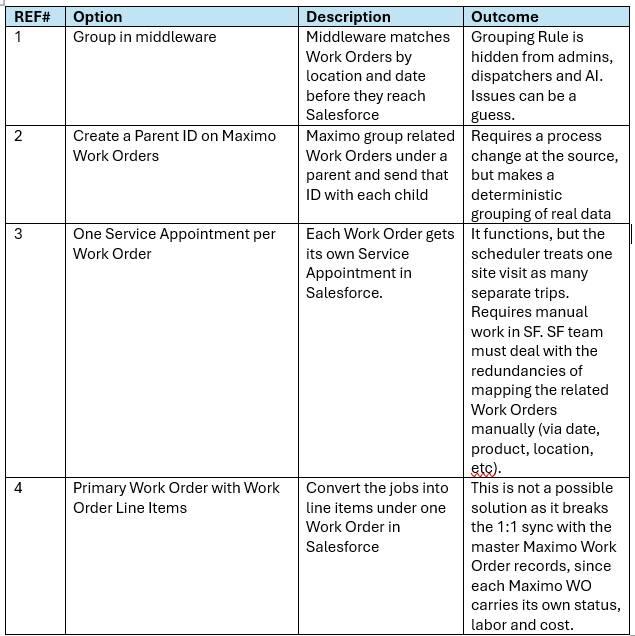
Solution Details Overview (from the table above):
Option 1: Group in middleware. Use middleware to move data, not to decide the grouping. Your teams will require more control over the groupings and associated acceptations. They will be required to make changes, apply rules, adjust for additional Work Orders from Maximo related to the Location, etc. Grouping rules buried in the middleware will also be invisible to admins, dispatchers and AI, and they're usually still guessing from location and date and errors will be difficult to track. Overall, using Middleware to group the Work Orders is what I would consider strong arming a solution which puts too much risk on the process.
Use Case Additions: There are also use cases that happen occasionally, like 2 additional Work Orders that are related to the Work Order batch but require different skill sets and timelines (one has to be finished before the other can start). They have the same location and date, and they both have to be scheduled after the initial batch of Work Orders is finished. These dependent Work Orders will need a different set of rules for scheduling. Something you don’t want to run in your middleware.
Keep the two dependent Work Orders out of the bundle and link them to it as a sequence, so the scheduler sees three steps: the batch, then job A, then job B.
Send the sequence from Maximo as data. This is the same principle as the parent ID. Each Work Order needs the visit group it belongs to, plus either a phase number (1 for the batch, 2 and 3 for the dependents) or a predecessor Work Order ID. Review Maximo's flow control which holds predecessor relationships and verify.
There are more details but systems will vary on execution and need to be mapped out.
Option 2: Create a Parent ID on Maximo Work Orders to group the work at the source. Have Maximo group related Work Orders under a parent Work Order, using Maximo's own parent/child hierarchy, and send that Parent ID on every child record to Salesforce. This puts the decision of which jobs belong together where the planning actually happens, as real data rather than as inference (best guess).
As a Rule I prefer to have the data tables or records and relationships organized and ready for execution before sending to Salesforce. Why? Because Salesforce is an ‘actionable’ database, its entire purpose is to move records forward. Give it the records as they need to be executed on, not as an unmanaged table that needs to be transformed.
Option 3: One Service appointment per Work Order without bundling. It works technically, but the scheduler treats seven jobs at one site as seven separate trips. As mentioned, it requires manual work in SF to apply some order of hierarchy and management for the field service teams and don’t forget about the dispatchers who now have 7 appointments to book instead of 1 leaving the redundancies of mapping the related Work Orders in multiple departments. This is not a sustainable solution and creates tribal knowledge which should be tagged as high risk as a few people or a person owns this knowledge and should they leave or should something happen it would impact the company in a negative way.
Option 4: Use Primary Work Order with Work Order Line Items. You can’t sync Work Order Line Item records back to individual master Work Orders in Maximo. Each Maximo Work Order has its own status, labor and cost, and a line item can't carry that back cleanly.
Our Solution
The best solution is a combination of options 2 and 3, plus a native Salesforce Field Service feature that removes the redundancy I reference and is a major concern in option 3: Appointment Bundling plus the Parent Work Order ID from Maximo applied to all the children.
Appointment Bundling by Salesforce: “Group short appointments at nearby or same-site locations to create a bundle. After bundling is set up, you can automate the creation and update of bundles, or dispatchers can manually bundle appointments.”
Give each child a Service Appointment and bundle them (option 3, made efficient). Service appointment bundling lets you collect multiple service appointments and define them as a single entity, called a bundle. Only the bundle is scheduled, not the bundle members, so the crew and dispatcher see one visit while each job keeps its own status.
You can automate it: a restriction policy defines restriction fields so that only service appointments with the same field values can be bundled together. Use the Maximo parent ID as that restriction field.
Design Note: The fields in the list are service appointment fields, not Work Order fields, so copy the parent ID onto the appointment. Live Bundling updates or creates bundles when service appointments are modified or added, which suits records arriving from an integration.
What if Maximo can't provide a parent ID
Due to powers out of my control, eg. a massive ticket backlog, I was not able to have the Parent ID field applied to the Maximo Work Order to match the child Work Orders until much later than I would have liked so I had to fall back to bundling on location plus date.
For date fields, you can restrict the bundle based on the calendar date rather than the time of day. That's still an inference (an educated guess), but it becomes a declared, visible rule in Salesforce instead of manual work which we used as a crutch to get us to the preferred design.
Design Note: Before committing, check the bundling limitations for your client org's volumes and licensing.
Bundling Sources:
What this gave AI. With the Parent ID in place, the visit exists as data. An agent can go from the parent Work Order to its seven children, to the one bundled appointment, to the crew assigned. "What is the crew doing at this site tomorrow?" has one answer, and a request to schedule produces one trip, not seven. Even the temporary rule of location plus date was an improvement, because the grouping was a declared rule in Salesforce that an admin, a dispatcher or an agent could see. It’s a move toward a deterministic system meaning the relationship is stored as data rather than inferred.
The takeaway
These two use cases took a look at two ways to address the data model gap. One gap was inside Salesforce and the other was between two systems. The cause was the same in that data existed, but the relationship didn't. People had to come in and fill the gap with what tribal knowledge that works until you ask AI to do the job, because AI can only work with what the model provides.
With our solutioning, a lookup, a Parent ID and rules written are available for admins and architects to view and edit when needed. These roles become the new teachers of AI and define how the business runs with models designed with clear intention. It’s building for antifragile systems and your data model is your AI strategy.
3. Overloading Standard Objects
Use case 3 is focused on avoiding overloading standard objects. This one is straight forward but doesn’t get much attention. I rarely see this as a practice in any AI strategies but it’s extremely valuable for understanding the state of the org before you get started.
To begin with, before you approach this task you first must understand that there are 2 types of objects in your org:
Standard Structural Objects: There are objects that act as foundational structural objects for other objects. They hold data that doesn’t change often and provides the foundational information for objects that push processes forward. The Account, Contact and Contract objects are examples of this.
Actionable objects: Designed to move events, data, records and processes forward. The Case, Opportunity, Work Order, Service Appointment objects are examples of this.
In many cases I’ve seen people overload objects because its easier to stack sets (sets of flows, code, triggers, etc) on one object. At first things are working but as more sets get added since this is the best practice, the system starts to slow down when the object starts hitting its limits until the company is forced to call in someone like me to make the necessary adjustments. Eg. Opportunity object has a 500-field threshold. That doesn’t mean you can stack it and run the limits.
Take Action: When I begin a project I will do a quick checkin on the a few objects starting with the Account to see how many workflows, triggers and code have been created and what it does. If the Account or other objects have been overloaded I will push these into actionable standard objects that are designed for these items. When a client overloads a standard object outside of its design it slows down all actions of that object.
There is also the case of trying to fit an action, event or flow into a standard object that doesn’t align with its purpose. For example, using Opportunities to manage anything other than revenue $$$ will end up working against your org and your AI strategy. Here are a few examples of negative uses for opportunities that belong in custom objects for reference with some solutions:
Internal Company Project Tracking: I see this quite often. Teams will use opportunities to track internal company tasks, or in their IT rollouts which get embedded in the rollout model, or projects rather than actual sales with clients. Use standard Tasks & Milestones with a Custom Parent Object called “Project X” as you may have different types of projects to manage in the future.
Tracking non-revenue customer check-ins: Teams will use the opportunity as a feature to drive structure for customer management. Salesforce doesn’t really have something that is designed specifically for this so using the Opportunity is a default because it works but it’s a heavy object meant for heavy sales pipelines, not customer status or onboarding milestones that carry no monetary value.
Support Tickets & Issue Escalations: Forcing support issues into opportunities destroys pipeline visibility and prevents your customer service teams from using proper ticketing workflows. Use the standard Case object with assignment and escalation rules. Your teams will be able to measures Time to Resolution and SLA compliance instead of close dates and deal amounts.
Transactional / E-Commerce Orders: This is an interesting one because it does track to revenue but that revenue is low value, high volume and the input is from . highly automated web orders or recurring micro-purchases. These revenue driving sales opportunities need a separate model and process that doesn’t overwhelm the purpose and intent of the company sales pipeline.
Non-Sales Renewals: Managing automated contract milestones. Eg. Use standard Asset object for Subscriptions & IT Inventory or a custom object for flexibility.
Design Note: For many of the items above you can use standard structural objects that already inherit account relationships, or build a lightweight custom architecture. You can make additional changes to a custom object without impacting the standard objects limits and purpose. This will allow the org to function properly and support the blueprint for your AI initiatives.
The takeaway is simple for this one. Don’t overload your objects outside their designed purpose. It will slow down the org as a whole and will have other downstream impacts on other flows and triggers. It will impact additional future projects like a submarine with cracks going deeper until something leaks or breaks.
Designing Models for AI: Principles for Architects and Admins
To use the company’s data model schema to teach AI, you will need to operate by some set of principles. Here are a few that you can review with your team before the project starts:
Make relationships explicit. Use lookups the AI can traverse. Don’t make it guess, it should be very clear for a human first. That is what you want. If a human can’t figure it out without tribal knowledge or jumping object records – neither can AI. AI wants to make you happy and you may get confident information that is wrong.
Give every object one clear meaning. An Opportunity should mean potential revenue, everywhere and should not take on additional roles outside its description. Find the object that fits the role. This is related to our 3rd use case.
Write descriptions as if the AI will read them, because it will. I push Metadata a lot in my articles for good reason. Metadata describes a detailed view of the data like object and field descriptions, workflows, validation rules, etc. It rolls into the help text your people use daily. It keeps your picklist values clean. It also makes the transition from architects much easier. All these items are now part of the AI's vocabulary so make it robust, clear, detailed and intentional.
Design Note: Get used to running Metadata exercises where you pull out the field tables and fill them in with standards and details (preferably from the architectural team) needed for AI to read and understand ‘what’ that field does and ‘why’ or value it provides. I make them into requires of Who its for, What it does, Why it does it and some reference to relationships if there are any. Make it as clear as you would for a new hire business analyst (eg. Your Agent).
Enforce the chain. Use required lookups and validation rules, so per requirements for this Salesforce project, Cases have Assets and Work Orders have Cases. Orphaned records are gaps in the story and will directly impact your blueprint that is developed for your AI initiatives. Also, use Junction Objects properly, they are one of the key pieces in your arsenal. You don’t see them but they need to be reviewed and cleaned up as well.
Treat schema changes as changes to how AI thinks. Adding a field or repurposing an object is no longer a local department or regional decision. Review it the way you'd review a change to business logic for downstream and upstream impacts to the AI understanding of how the business is operating. It directly impacts your blueprint.
Thank you.